01What Readerr reads and what it skips
Readerr reads four kinds of block: paragraphs, headings, lists and quotes. Group and Columns blocks are opened up, so the paragraphs inside them are read as usual. Any block that is not on that list is skipped, and skipped text costs no characters.
| Block | In the audio |
|---|---|
| Paragraph | Read |
| Heading | Read |
| List | Read |
| Quote | Read |
| Group and Columns (what is inside is read as usual) | Read |
| Custom HTML | Skipped |
| Embeds | Skipped |
| Buttons | Skipped |
| Galleries | Skipped |
| Blocks from other plugins, such as a carousel or an info box | Skipped |
| Image captions and code blocks | Skipped |
| The post title | Skipped |
Any block with the class readerr-skip | Skipped |
Headings get a pause: Readerr adds a full stop at the end so the voice stops before the next paragraph. Emoji are removed and do not count.
02Leave out a paragraph, list or any other block
Add the class readerr-skip to the block. It works on any block, including the ones Readerr normally reads, such as a "Read also" paragraph or a sponsored note.
Select the block
Click the block in the editor. To leave out several blocks at once, put them in a Group block and select the Group. A class on a Group or Columns block removes everything inside it.
Open Advanced and add the class
In the block settings in the right-hand sidebar, open Advanced. In Additional CSS class(es), type
readerr-skip. If the field already has classes, add a space and then the new one. Do not delete what is there.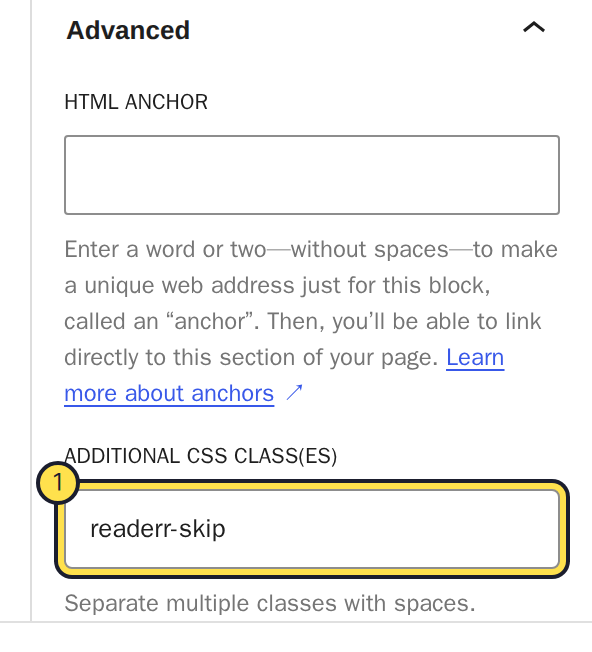
The class goes in Additional CSS class(es), under Advanced.Full size Save the post
Save or update the post. The block stays on the page for your readers. It is only left out of the audio.
In the classic editor there is no sidebar for this. Switch to the Code tab (Text in older WordPress) and add class="readerr-skip" to the HTML element.
If the post already has audio, the class does not change that audio. The change only shows in audio made after it. Will editing a published post make new audio explains when that happens.
03Check the effect with the estimated cost
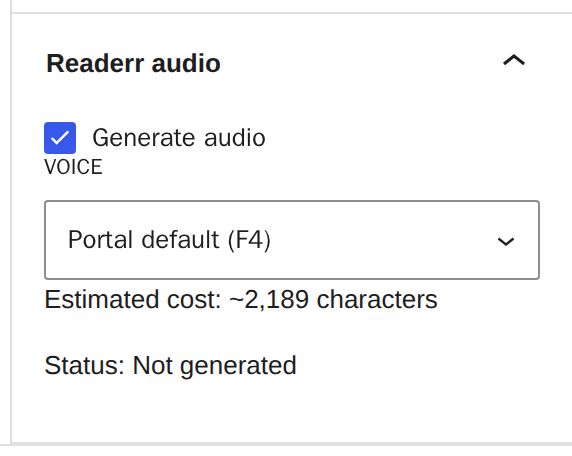
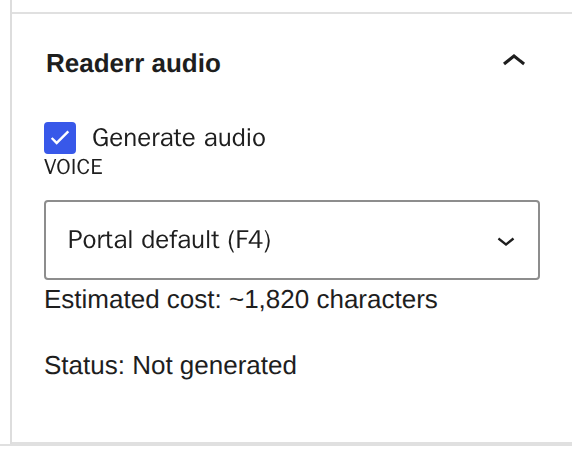
In the block editor, the Readerr audio panel shows Estimated cost in characters. It counts the same text Readerr bills, so it updates as you add the class. In this example the estimate falls from about 2,189 to about 1,820 characters after a Group block gets the class.
The classic editor has no estimate. What counts as a character covers what billing counts.
04When text goes missing without the class
Some text is skipped even if you never added readerr-skip. If a paragraph is missing from your audio, look for these:
- An element whose class or id contains
related,newsletter,author-bio,gallery,advertorbreadcrumb, or the wordcta. A theme class such ashas-advertisingmatchesadvert. - A link marked
rel="sponsored". - An element with the role navigation, banner, contentinfo or complementary.
- A shortcode. Shortcodes registered on your site are removed together with their content, including
[caption]. A shortcode that prints real text leaves a gap in the audio. - A dynamic block such as "latest posts".
Rename the class or id that matches, and the text is read again on the next audio.
05If something goes wrong
A block is still read. Check the class is spelled readerr-skip, with a hyphen, and that it sits on the block you meant. Audio that already exists is not made again by this change.
The whole box disappeared. A class on a Group or Columns block leaves out everything inside. Move the class to the single block you wanted.
The estimate did not change. The estimate counts text blocks only. A block that was already skipped, such as Custom HTML, does not change it.