01Why a word or number is read wrong
A voice reads written characters and has no way to ask what you meant. "No. 14", "approx." or "3,400" can each be read several ways, and a name it has never met has no right way at all. Readerr prepares the text before the voice reads it: it works out how names, foreign words, abbreviations, numbers and dates should sound and gives the voice that reading. The page itself does not change, so readers still see your original text.
The preparation is automatic, so it can miss a case or choose the wrong reading. Some readings are kept in a shared pronunciation list for each language, so a reading we correct once is used for every later post. Why voices misread numbers shows typical cases.
02What to send us
To report a reading that is wrong, send us four things: where it is, the text as written, what you expect and your site's language. A time in the audio, such as 1:42, helps us find it.
- The post: the address of the post that has the word or number.
- The text as written: copy the word or number exactly, with the sentence around it.
- How it should sound: write it the way you would say it, in plain letters, for example "Leicester Square should sound like lester square" or "read 3,400 as three thousand four hundred".
- The language of your site: it is the Article language in Settings, then Readerr.
If the wrong word is your company or product name, use the page about company names.
03How to send it
The contact form is the only way to report it. There is no setting for it in the plugin or the panel, and the form has no topic called pronunciation.
Open the contact form
Go to the contact page. Under What is it about? choose A question.
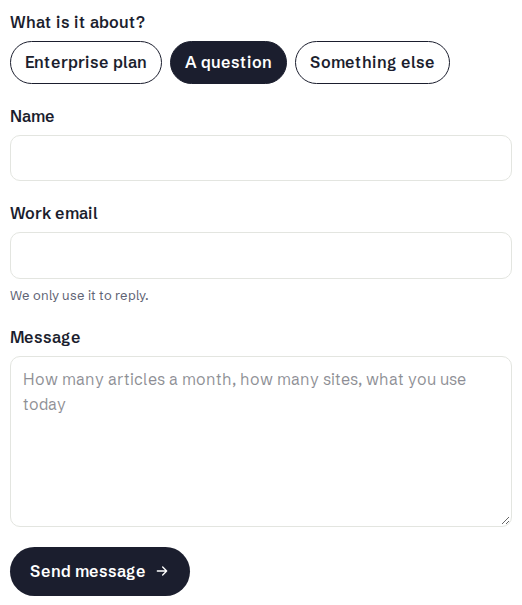
Choose A question and write the three things above in the Message field.Full size Fill in the form and send it
Enter your name and your work email, which we use only to reply. Put the post address, the text as written and how it should sound in Message, then press Send message. We read every message.
04What happens next
We check the reading. Where it can be corrected, we change how that text is read in the pronunciation list for your language. We cannot promise that every case can be fixed, and we do not give a time. New audio then reads it the corrected way.
Audio you already have does not change by itself, and fixing the list does not make new audio for old posts. A correction reaches a published post only when that post gets new audio.
05Get the corrected audio for a published post
There is no Regenerate button. A post gets new audio only after a change to its text or voice, so make a small edit and ask for new audio on that save. It costs the post's full characters again. Do this only after we tell you the reading is corrected. Otherwise you pay for new audio that still has the old reading.
Edit the post a little
Make a small change to the text, ideally one you wanted anyway, such as a typo fix. The box in the next step appears only when the text differs from what the audio was made from.
Untick Keep current audio and save
In the Readerr audio panel, untick Keep current audio, then press Save (Update in older WordPress). The status becomes Queued, and the old audio plays until the new file is ready.
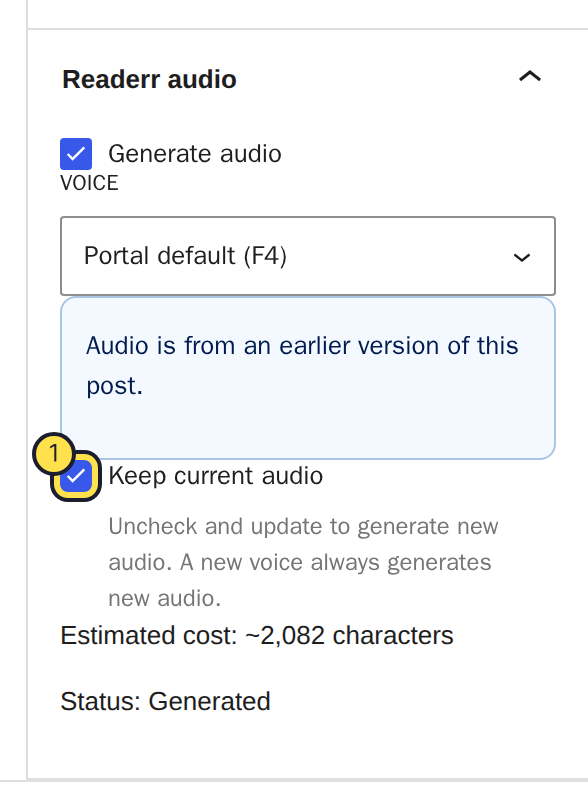
Untick the highlighted box before you save.Full size
Changing the voice of the post and saving also makes new audio. Editing a published post explains both ways and what they cost.
06What you can do yourself
You can report the reading and choose which old posts get new audio, but you cannot add a reading yourself. Do not respell the word in your text. Readers would see the odd spelling on your page, and you would have to repeat it in every post. Write the text the normal way and let us correct the reading.
Whether to make new audio for the old posts is your decision, because it costs the characters again. For a few posts that matter, it is worth it. For the rest, new posts get the corrected reading automatically. See characters and limits for what counts.