01The timeline at a glance
When a trial or a paid plan ends, you get 7 days of grace, and then the players disappear. New audio stops on the day it ends. Players already on your site keep playing for the 7 days. After that, the plugin hides them, and your audio files are kept.
| Stage | New audio | Players on your site | What you see |
|---|---|---|---|
| Trial or plan running | Made for new posts | Playing | The plan or Trial pill in the panel; for a trial, the days left |
| Grace week (7 days) | Not made | Keep playing | Yellow banner in the panel, yellow notice in WordPress |
| After the grace week | Not made | Hidden | Red banner in the panel |
A paid plan that Stripe marks as unpaid or cancelled follows the same timeline. The seven days start on the day access ends.
02During the grace week
During the grace week, nothing changes for your readers. The audio on your published posts keeps playing. New posts get no audio, and the editor shows the status Character limit reached - no audio. The plugin cannot tell an ended trial from a used-up pool, so it shows the same text for both. The customer panel gives the real reason.

In WordPress, the Settings, then Readerr screen and the Readerr audio panel show a yellow notice that starts with Trial ended and gives the date until which players keep playing, with a Choose a plan link. The notice says Trial ended even when a paid plan ran out.

03After the grace week
After the grace week, the plugin hides the players and the waiting bars, stops loading the player script and clears your page cache. Your audio files stay stored. Readers see your posts without audio, and nothing else on the page changes.

Posts you publish after access ended get no audio. The panel does not list them, so note which posts they are.
04Get the players back
To get the players back, choose a plan. The audio for your older posts is still there and returns with the players.
Choose a plan
In the customer panel, press Choose a plan, pick Start, Portal or Newsroom, and choose monthly or yearly. You pay through Stripe. Prices and characters per plan are on the pricing page.
Wait for the players, or open the plugin settings
The players return within a day. To see them at once, open Settings, then Readerr in WordPress, which checks your access right away.
Send posts that have no audio
Posts published after your access ended need audio. Save each one, using Quick Edit if the editor button is grey (see how to add audio to older posts). Characters for the new plan count from the start of its period.
05Cancelling your plan
To cancel, open Account in the panel and press Invoices, card and cancelling in the Plan box. This opens the Stripe billing portal. When the plan is set to end on a later day, the Plan box shows an Ends row with that day. The grace week starts after it.
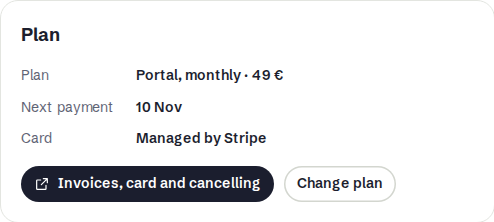
To switch plans instead, press Change plan.
06What happens to your data
Your audio files are kept while the grace week runs and afterwards, so choosing a plan brings the players back. That holds only while your account exists. An account can be deleted 30 days after the grace period ends. Deletion removes the account from our database and the audio files from our content delivery network. See the privacy policy for how we handle your data.
If you are not sure which of these stages you are in, open the customer panel. Its banner tells you, and the Plan box under Account shows the dates. For questions, contact us.